Class CharmListView<T,K extends Comparable>
- java.lang.Object
-
- javafx.scene.Node
-
- javafx.scene.Parent
-
- javafx.scene.layout.Region
-
- javafx.scene.control.Control
-
- com.gluonhq.charm.glisten.control.CharmListView<T,K>
-
- Type Parameters:
T- This type is used to represent the type of the objects stored in the CharmListViewsitemsObservableList.K- This is type returned by theheaders functionwhen applied to theitemsto generate the keys in a sorted map that will define the headers. It extendsComparable, so elements can have a natural order, without the need to specify a comparator. usually one field of T, so the CharmListView control can differ headers for the list by applying a Function over the elements.
- All Implemented Interfaces:
Styleable,EventTarget,Skinnable
@DefaultProperty("items") public class CharmListView<T,K extends Comparable> extends Control
A CharmListView displays a vertical list of items from which the user may select, while new items are inserted as headers, as a result of applying over the underlying model aheader function. Headers can be seen as the keys in a sorted map, that once defined are used to classify the items. For every category, the first item is duplicated and marked as header. Different formatting and sorting options can be applied to the header items so they can be distinguised from the standard items. By default the header for the top most visible item is displayed floating on top of the list, and it is replaced with the next one when the list is scrolled with a slide out effect. The control uses internally a HeadersList class: anObservableListthat wraps a SortedList and the headers created by the header function.Populating a CharmListView
A simple example of how to create and populate a CharmListView of names (Strings) ordered and classified by their number of letters is shown here:
 ObservableList<String> names = FXCollections.observableArrayList(
          "Julia", "Ian", "Sue", "Matthew", "Hannah", "Stephan", "Denise");

 CharmListView<String, Integer> charmListView = new CharmListView<>(names);
 charmListView.setHeadersFunction(String::length);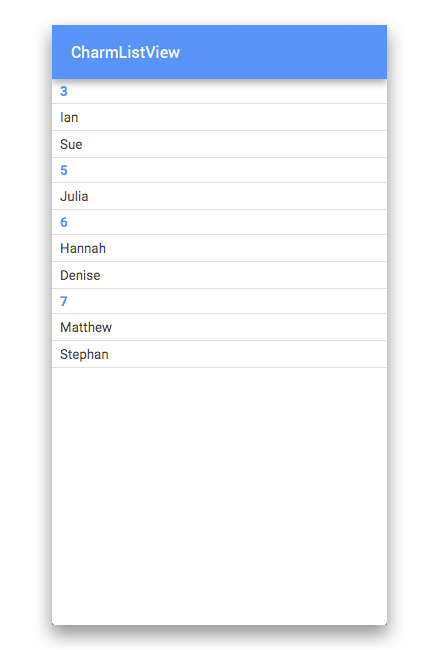
Another feasible approach for setting the items is to simply call:
 ObservableList<T> content = ...
 charmListView.setItems(content);
The elements of the CharmListView are contained within the
itemsObservableList. This ObservableList is automatically observed by the CharmListView, such that any changes that occur inside the ObservableList will be automatically shown in the CharmListView itself and, consequently, headers will be updated too.Formatting the Headers of a CharmListView
Following with the previous example, now a cell factory for the headers will be provided:
charmListView.setHeaderCellFactory(
The same result could be achieved by providing ap->new ListCellImpl<String>(){ @Override protected void updateItem(String item, boolean empty) { super.updateItem(item, empty); if(item!=null && !empty){ setText("Length: " + Integer.toString(item.length())); setGraphic(null); } else { setText(null); setGraphic(null); } } });StringConverterto the function:charmListView.setConverter(new StringConverter
and calling<Integer>() { @Override public String toString(Integer object) { return "Length: " + Integer.toString(object); } });toStringon the header cell factoryupdateItem:setText(charmListView.toString(item));Sorting headers and items
There are two type of comparators that can be added to a CharmListView to sort the items:comparatorProperty()for the standard items, andheadersComparatorProperty()for the header items. For instance, this comparator will reverse the natural order for the cells within headers:
If no comparator is provided, the cells will be placed in the same order they were provided. This will reverse the order on the headers, while sorting by natural order on the standard cells:charmListView.setComparator((s1,s2)->s2.compareTo(s1)); {"3", "Sue", "Ian", "5", "Julia", "6", "Hannah", "Denise", "7", "Stephan", "Matthew"}charmListView.setHeaderComparator((i1,i2)->i2-i1); charmListView.setComparator((s1,s2)->s1.compareTo(s2)); {"7", "Matthew", "Stephan", "6", "Denise", "Hannah", "5", "Julia", "3", "Ian", "Sue"}- Since:
- 1.0.0
- See Also:
CharmListCell
-
-
Property Summary
Properties Type Property Description ObjectProperty<Callback<CharmListView<T,K>,CharmListCell<T>>>cellFactoryThe cell factory for standard items.ObjectProperty<Callback<CharmListView<T,K>,CharmListCell<T>>>cellHeaderFactoryThe cell factory for header items.ObjectProperty<Comparator<? super T>>comparatorThe comparator that denotes the order of the items within the headers.ObjectProperty<StringConverter<K>>converterTheStringConverterproperty used to format the result of type K after applying theheaders functionto the data modelBooleanPropertyfloatingHeaderVisibleBy default the header for the most top visible item is displayed floating on top of the list, and it is replaced with the next one when the list is scrolled with a slide out effect.ObjectProperty<Comparator<? super K>>headersComparatorThe comparator that denotes the order of the headers.ObjectProperty<Function<? super T,K>>headersFunctionTheFunctionfor the CharmListView.ListProperty<T>itemsThe underlying data model for the CharmListView.ObjectProperty<EventHandler<ActionEvent>>onPullToRefreshTheEventHandlerto be called whenever there's a Swipe Refresh.ObjectProperty<Node>placeholderThis Node is shown to the user when the CharmListView has no content to show.BooleanPropertyrefreshIndicatorVisibleThe visibility of a refresh indicator that will signal to the user that this list is busy updating itself.ObjectProperty<T>selectedItemRefers to the selected item property, which is used to indicate the currently selected item in the CharmListView.-
Properties inherited from class javafx.scene.control.Control
contextMenu, skin, tooltip
-
Properties inherited from class javafx.scene.layout.Region
background, border, cacheShape, centerShape, height, insets, maxHeight, maxWidth, minHeight, minWidth, opaqueInsets, padding, prefHeight, prefWidth, scaleShape, shape, snapToPixel, width
-
Properties inherited from class javafx.scene.Parent
needsLayout
-
Properties inherited from class javafx.scene.Node
accessibleHelp, accessibleRoleDescription, accessibleRole, accessibleText, blendMode, boundsInLocal, boundsInParent, cacheHint, cache, clip, cursor, depthTest, disabled, disable, effectiveNodeOrientation, effect, eventDispatcher, focused, focusTraversable, focusVisible, focusWithin, hover, id, inputMethodRequests, layoutBounds, layoutX, layoutY, localToParentTransform, localToSceneTransform, managed, mouseTransparent, nodeOrientation, onContextMenuRequested, onDragDetected, onDragDone, onDragDropped, onDragEntered, onDragExited, onDragOver, onInputMethodTextChanged, onKeyPressed, onKeyReleased, onKeyTyped, onMouseClicked, onMouseDragEntered, onMouseDragExited, onMouseDragged, onMouseDragOver, onMouseDragReleased, onMouseEntered, onMouseExited, onMouseMoved, onMousePressed, onMouseReleased, onRotate, onRotationFinished, onRotationStarted, onScrollFinished, onScroll, onScrollStarted, onSwipeDown, onSwipeLeft, onSwipeRight, onSwipeUp, onTouchMoved, onTouchPressed, onTouchReleased, onTouchStationary, onZoomFinished, onZoom, onZoomStarted, opacity, parent, pickOnBounds, pressed, rotate, rotationAxis, scaleX, scaleY, scaleZ, scene, style, translateX, translateY, translateZ, viewOrder, visible
-
-
Field Summary
-
Fields inherited from class javafx.scene.layout.Region
USE_COMPUTED_SIZE, USE_PREF_SIZE
-
Fields inherited from class javafx.scene.Node
BASELINE_OFFSET_SAME_AS_HEIGHT
-
-
Constructor Summary
Constructors Constructor Description CharmListView()Creates a default CharmListView which will display contents stacked vertically.CharmListView(ObservableList<T> list)Creates a default CharmListView which will stack the contents retrieved from the providedObservableListvertically.
-
Method Summary
All Methods Instance Methods Concrete Methods Modifier and Type Method Description ObjectProperty<Callback<CharmListView<T,K>,CharmListCell<T>>>cellFactoryProperty()The cell factory for standard items.ObjectProperty<Callback<CharmListView<T,K>,CharmListCell<T>>>cellHeaderFactoryProperty()The cell factory for header items.ObjectProperty<Comparator<? super T>>comparatorProperty()The comparator that denotes the order of the items within the headers.ObjectProperty<StringConverter<K>>converterProperty()TheStringConverterproperty used to format the result of type K after applying theheaders functionto the data modelprotected Skin<?>createDefaultSkin()BooleanPropertyfloatingHeaderVisibleProperty()By default the header for the most top visible item is displayed floating on top of the list, and it is replaced with the next one when the list is scrolled with a slide out effect.Callback<CharmListView<T,K>,CharmListCell<T>>getCellFactory()Returns the current cell factory callback function for standard items.Comparator<? super T>getComparator()Returns theComparatorthat is used to sort the standard itemsStringConverter<K>getConverter()Returns theStringConverterused to format the headers.Callback<CharmListView<T,K>,CharmListCell<T>>getHeaderCellFactory()Returns the current cell factory callback function for header items.Comparator<? super K>getHeaderComparator()Returns theComparatorthat is used to sort the headers itemsFunction<? super T,K>getHeadersFunction()Returns theFunctionthat is used to generate the headersObservableList<T>getHeadersList()Returns anObservableListthat contains the items currently being shown to the user including the headers.EventHandler<ActionEvent>getOnPullToRefresh()Gets the value of the property onPullToRefresh.NodegetPlaceholder()Returns theNodeto be shown to the user when the CharmListView has no content to show.TgetSelectedItem()Gets the value of the property selectedItem.ObjectProperty<Comparator<? super K>>headersComparatorProperty()The comparator that denotes the order of the headers.ObjectProperty<Function<? super T,K>>headersFunctionProperty()TheFunctionfor the CharmListView.booleanisFloatingHeaderVisible()Returns true if the floating header for the most top visible item is visible, or false otherwise.booleanisRefreshIndicatorVisible()Gets the value of the property refreshIndicatorVisible.ListProperty<T>itemsProperty()The underlying data model for the CharmListView.ObjectProperty<EventHandler<ActionEvent>>onPullToRefreshProperty()TheEventHandlerto be called whenever there's a Swipe Refresh.ObjectProperty<Node>placeholderProperty()This Node is shown to the user when the CharmListView has no content to show.voidrefresh()Callingrefresh()forces the CharmListView control to recreate and repopulate the cells necessary to populate the visual bounds of the control.BooleanPropertyrefreshIndicatorVisibleProperty()The visibility of a refresh indicator that will signal to the user that this list is busy updating itself.voidscrollTo(int index)Scrolls the CharmListView so that the item in the given index is the first visible item within the viewport, after the floating header if the latter is visiblevoidscrollTo(T object)Scrolls the CharmListView so that the given item is the first visible item within the viewport, after the floating header if the latter is visiblevoidscrollToHeader(T object)Scrolls the CharmListView so that the given header is the first visible header within the viewportObjectProperty<T>selectedItemProperty()Refers to the selected item property, which is used to indicate the currently selected item in the CharmListView.voidsetCellFactory(Callback<CharmListView<T,K>,CharmListCell<T>> value)Sets a new cell factory to use for the standard items in the CharmListView.voidsetComparator(Comparator<? super T> comparator)Sets the comparator for the standard items of the CharmListView.voidsetConverter(StringConverter<K> value)Sets theStringConverterto be used to format the headersvoidsetFloatingHeaderVisible(boolean visible)Sets the visibility of the floating header for the most top visible item.voidsetHeaderCellFactory(Callback<CharmListView<T,K>,CharmListCell<T>> value)Sets a new cell factory to use for the header items in the CharmListView.voidsetHeaderComparator(Comparator<? super K> headerComparator)Sets the comparator for the header items of the CharmListView.voidsetHeadersFunction(Function<? super T,K> function)Sets the headers function for the CharmListView.voidsetItems(ObservableList<T> value)Sets the underlying data model for the CharmListView.voidsetOnPullToRefresh(EventHandler<ActionEvent> eventHandler)Sets the value of the property onPullToRefresh.voidsetPlaceholder(Node value)Sets aNodeto be shown to the user when the CharmListView has no content to show.voidsetRefreshIndicatorVisible(boolean value)Sets the value of the property refreshIndicatorVisible.voidsetSelectedItem(T value)Sets the value of the property selectedItem.StringtoString(T item)A convenient method to format the result of applying theheaders functionto the given item, using thestring converterif it is provided.-
Methods inherited from class javafx.scene.control.Control
computeMaxHeight, computeMaxWidth, computeMinHeight, computeMinWidth, computePrefHeight, computePrefWidth, contextMenuProperty, executeAccessibleAction, getBaselineOffset, getClassCssMetaData, getContextMenu, getControlCssMetaData, getCssMetaData, getInitialFocusTraversable, getSkin, getTooltip, isResizable, layoutChildren, queryAccessibleAttribute, setContextMenu, setSkin, setTooltip, skinProperty, tooltipProperty
-
Methods inherited from class javafx.scene.layout.Region
backgroundProperty, borderProperty, cacheShapeProperty, centerShapeProperty, getBackground, getBorder, getHeight, getInsets, getMaxHeight, getMaxWidth, getMinHeight, getMinWidth, getOpaqueInsets, getPadding, getPrefHeight, getPrefWidth, getShape, getUserAgentStylesheet, getWidth, heightProperty, insetsProperty, isCacheShape, isCenterShape, isScaleShape, isSnapToPixel, layoutInArea, layoutInArea, layoutInArea, layoutInArea, maxHeight, maxHeightProperty, maxWidth, maxWidthProperty, minHeight, minHeightProperty, minWidth, minWidthProperty, opaqueInsetsProperty, paddingProperty, positionInArea, positionInArea, prefHeight, prefHeightProperty, prefWidth, prefWidthProperty, resize, scaleShapeProperty, setBackground, setBorder, setCacheShape, setCenterShape, setHeight, setMaxHeight, setMaxSize, setMaxWidth, setMinHeight, setMinSize, setMinWidth, setOpaqueInsets, setPadding, setPrefHeight, setPrefSize, setPrefWidth, setScaleShape, setShape, setSnapToPixel, setWidth, shapeProperty, snappedBottomInset, snappedLeftInset, snappedRightInset, snappedTopInset, snapPosition, snapPositionX, snapPositionY, snapSize, snapSizeX, snapSizeY, snapSpace, snapSpaceX, snapSpaceY, snapToPixelProperty, widthProperty
-
Methods inherited from class javafx.scene.Parent
getChildren, getChildrenUnmodifiable, getManagedChildren, getStylesheets, isNeedsLayout, layout, lookup, needsLayoutProperty, requestLayout, requestParentLayout, setNeedsLayout, updateBounds
-
Methods inherited from class javafx.scene.Node
accessibleHelpProperty, accessibleRoleDescriptionProperty, accessibleRoleProperty, accessibleTextProperty, addEventFilter, addEventHandler, applyCss, autosize, blendModeProperty, boundsInLocalProperty, boundsInParentProperty, buildEventDispatchChain, cacheHintProperty, cacheProperty, clipProperty, computeAreaInScreen, contains, contains, cursorProperty, depthTestProperty, disabledProperty, disableProperty, effectiveNodeOrientationProperty, effectProperty, eventDispatcherProperty, fireEvent, focusedProperty, focusTraversableProperty, focusVisibleProperty, focusWithinProperty, getAccessibleHelp, getAccessibleRole, getAccessibleRoleDescription, getAccessibleText, getBlendMode, getBoundsInLocal, getBoundsInParent, getCacheHint, getClip, getContentBias, getCursor, getDepthTest, getEffect, getEffectiveNodeOrientation, getEventDispatcher, getId, getInitialCursor, getInputMethodRequests, getLayoutBounds, getLayoutX, getLayoutY, getLocalToParentTransform, getLocalToSceneTransform, getNodeOrientation, getOnContextMenuRequested, getOnDragDetected, getOnDragDone, getOnDragDropped, getOnDragEntered, getOnDragExited, getOnDragOver, getOnInputMethodTextChanged, getOnKeyPressed, getOnKeyReleased, getOnKeyTyped, getOnMouseClicked, getOnMouseDragEntered, getOnMouseDragExited, getOnMouseDragged, getOnMouseDragOver, getOnMouseDragReleased, getOnMouseEntered, getOnMouseExited, getOnMouseMoved, getOnMousePressed, getOnMouseReleased, getOnRotate, getOnRotationFinished, getOnRotationStarted, getOnScroll, getOnScrollFinished, getOnScrollStarted, getOnSwipeDown, getOnSwipeLeft, getOnSwipeRight, getOnSwipeUp, getOnTouchMoved, getOnTouchPressed, getOnTouchReleased, getOnTouchStationary, getOnZoom, getOnZoomFinished, getOnZoomStarted, getOpacity, getParent, getProperties, getPseudoClassStates, getRotate, getRotationAxis, getScaleX, getScaleY, getScaleZ, getScene, getStyle, getStyleableParent, getStyleClass, getTransforms, getTranslateX, getTranslateY, getTranslateZ, getTypeSelector, getUserData, getViewOrder, hasProperties, hoverProperty, idProperty, inputMethodRequestsProperty, intersects, intersects, isCache, isDisable, isDisabled, isFocused, isFocusTraversable, isFocusVisible, isFocusWithin, isHover, isManaged, isMouseTransparent, isPickOnBounds, isPressed, isVisible, layoutBoundsProperty, layoutXProperty, layoutYProperty, localToParent, localToParent, localToParent, localToParent, localToParent, localToParentTransformProperty, localToScene, localToScene, localToScene, localToScene, localToScene, localToScene, localToScene, localToScene, localToScene, localToScene, localToSceneTransformProperty, localToScreen, localToScreen, localToScreen, localToScreen, localToScreen, lookupAll, managedProperty, mouseTransparentProperty, nodeOrientationProperty, notifyAccessibleAttributeChanged, onContextMenuRequestedProperty, onDragDetectedProperty, onDragDoneProperty, onDragDroppedProperty, onDragEnteredProperty, onDragExitedProperty, onDragOverProperty, onInputMethodTextChangedProperty, onKeyPressedProperty, onKeyReleasedProperty, onKeyTypedProperty, onMouseClickedProperty, onMouseDragEnteredProperty, onMouseDragExitedProperty, onMouseDraggedProperty, onMouseDragOverProperty, onMouseDragReleasedProperty, onMouseEnteredProperty, onMouseExitedProperty, onMouseMovedProperty, onMousePressedProperty, onMouseReleasedProperty, onRotateProperty, onRotationFinishedProperty, onRotationStartedProperty, onScrollFinishedProperty, onScrollProperty, onScrollStartedProperty, onSwipeDownProperty, onSwipeLeftProperty, onSwipeRightProperty, onSwipeUpProperty, onTouchMovedProperty, onTouchPressedProperty, onTouchReleasedProperty, onTouchStationaryProperty, onZoomFinishedProperty, onZoomProperty, onZoomStartedProperty, opacityProperty, parentProperty, parentToLocal, parentToLocal, parentToLocal, parentToLocal, parentToLocal, pickOnBoundsProperty, pressedProperty, pseudoClassStateChanged, relocate, removeEventFilter, removeEventHandler, requestFocus, resizeRelocate, rotateProperty, rotationAxisProperty, scaleXProperty, scaleYProperty, scaleZProperty, sceneProperty, sceneToLocal, sceneToLocal, sceneToLocal, sceneToLocal, sceneToLocal, sceneToLocal, sceneToLocal, sceneToLocal, screenToLocal, screenToLocal, screenToLocal, setAccessibleHelp, setAccessibleRole, setAccessibleRoleDescription, setAccessibleText, setBlendMode, setCache, setCacheHint, setClip, setCursor, setDepthTest, setDisable, setDisabled, setEffect, setEventDispatcher, setEventHandler, setFocused, setFocusTraversable, setHover, setId, setInputMethodRequests, setLayoutX, setLayoutY, setManaged, setMouseTransparent, setNodeOrientation, setOnContextMenuRequested, setOnDragDetected, setOnDragDone, setOnDragDropped, setOnDragEntered, setOnDragExited, setOnDragOver, setOnInputMethodTextChanged, setOnKeyPressed, setOnKeyReleased, setOnKeyTyped, setOnMouseClicked, setOnMouseDragEntered, setOnMouseDragExited, setOnMouseDragged, setOnMouseDragOver, setOnMouseDragReleased, setOnMouseEntered, setOnMouseExited, setOnMouseMoved, setOnMousePressed, setOnMouseReleased, setOnRotate, setOnRotationFinished, setOnRotationStarted, setOnScroll, setOnScrollFinished, setOnScrollStarted, setOnSwipeDown, setOnSwipeLeft, setOnSwipeRight, setOnSwipeUp, setOnTouchMoved, setOnTouchPressed, setOnTouchReleased, setOnTouchStationary, setOnZoom, setOnZoomFinished, setOnZoomStarted, setOpacity, setPickOnBounds, setPressed, setRotate, setRotationAxis, setScaleX, setScaleY, setScaleZ, setStyle, setTranslateX, setTranslateY, setTranslateZ, setUserData, setViewOrder, setVisible, snapshot, snapshot, startDragAndDrop, startFullDrag, styleProperty, toBack, toFront, toString, translateXProperty, translateYProperty, translateZProperty, usesMirroring, viewOrderProperty, visibleProperty
-
Methods inherited from class java.lang.Object
clone, equals, finalize, getClass, hashCode, notify, notifyAll, wait, wait, wait
-
Methods inherited from interface javafx.css.Styleable
getStyleableNode
-
-
-
-
Property Detail
-
items
public final ListProperty<T> itemsProperty
The underlying data model for the CharmListView. Note that it has a generic type that must match the type of the CharmListView itself. CharmListView control reacts to changes in this model.- See Also:
setItems(ObservableList)
-
headersFunction
public final ObjectProperty<Function<? super T,K extends Comparable>> headersFunctionProperty
TheFunctionfor the CharmListView. Note that it has a generic type T that must match the type of the CharmListView itself, and a generic type K that implementsComparable. The provided function will by applied to all the T items, returning elements of type K that will be sorted to obtain the unique keys that define the headers. CharmListView control reacts to changes in this function.- See Also:
getHeadersFunction(),setHeadersFunction(Function)
-
comparator
public final ObjectProperty<Comparator<? super T>> comparatorProperty
The comparator that denotes the order of the items within the headers. This criterion is applied after the header criterion. CharmListView control reacts to changes in this comparator.- See Also:
getComparator(),setComparator(Comparator)
-
headersComparator
public final ObjectProperty<Comparator<? super K extends Comparable>> headersComparatorProperty
The comparator that denotes the order of the headers. This criterion is applied in the first place to sort the headers. Note the type K of the comparator: the comparison will be applied of over the result of applying theheaders functionto the items of the list, and not over the items themselves. CharmListView control reacts to changes in this comparator.
-
converter
public final ObjectProperty<StringConverter<K extends Comparable>> converterProperty
TheStringConverterproperty used to format the result of type K after applying theheaders functionto the data model- See Also:
getConverter(),setConverter(StringConverter)
-
cellFactory
public final ObjectProperty<Callback<CharmListView<T,K extends Comparable>,CharmListCell<T>>> cellFactoryProperty
The cell factory for standard items. Setting a custom cell factory has the effect of deferring all cell creation, allowing for total customization of the cell. Internally, the CharmListView is responsible for reusing CharmListCells - all that is necessary is for the custom cell factory to return from this function a CharmListCell which might be usable for representing any item in the CharmListView. Refer to theCellclass documentation for more detail.- See Also:
getCellFactory(),setCellFactory(Callback)
-
cellHeaderFactory
public final ObjectProperty<Callback<CharmListView<T,K extends Comparable>,CharmListCell<T>>> cellHeaderFactoryProperty
The cell factory for header items. Setting a custom cell factory has the effect of deferring all cell creation, allowing for total customization of the cell. Internally, the CharmListView is responsible for reusing CharmListCells - all that is necessary is for the custom cell factory to return from this function a CharmListCell which might be usable for representing any item in the CharmListView. Refer to theCellclass documentation for more detail.
-
floatingHeaderVisible
public final BooleanProperty floatingHeaderVisibleProperty
By default the header for the most top visible item is displayed floating on top of the list, and it is replaced with the next one when the list is scrolled with a slide out effect. This can be enabled or disabled with this property.
-
placeholder
public final ObjectProperty<Node> placeholderProperty
This Node is shown to the user when the CharmListView has no content to show. This may be the case because the list model has no data in the first place or that a filter has been applied to the list model, resulting in there being nothing to show the user.- See Also:
getPlaceholder(),setPlaceholder(Node)
-
onPullToRefresh
public final ObjectProperty<EventHandler<ActionEvent>> onPullToRefreshProperty
TheEventHandlerto be called whenever there's a Swipe Refresh. ThisEventHandlerwill run on a background thread. To enable pull to refresh set a handler for this property.
-
refreshIndicatorVisible
public final BooleanProperty refreshIndicatorVisibleProperty
The visibility of a refresh indicator that will signal to the user that this list is busy updating itself.
-
selectedItem
public final ObjectProperty<T> selectedItemProperty
Refers to the selected item property, which is used to indicate the currently selected item in the CharmListView. The selected item is either null, to represent that there is no selection, or an Object that is retrieved from the underlying data model of the control the selection model is associated with.- See Also:
getSelectedItem(),setSelectedItem(T)
-
-
Constructor Detail
-
CharmListView
public CharmListView()
Creates a default CharmListView which will display contents stacked vertically. An emptyObservableListis created. To add elements to the control the recommended approach is callingsetItems(javafx.collections.ObservableList).Refer to the
CharmListViewclass documentation for details on the default state of other properties.
-
CharmListView
public CharmListView(ObservableList<T> list)
Creates a default CharmListView which will stack the contents retrieved from the providedObservableListvertically.Refer to the
CharmListViewclass documentation for details on the default state of other properties.- Parameters:
list- An observable list of elements of type T
-
-
Method Detail
-
getHeadersList
public final ObservableList<T> getHeadersList()
Returns anObservableListthat contains the items currently being shown to the user including the headers.- Returns:
- An
ObservableListcontaining the items to be shown to the user, including the inserted headers if aFunctionis provided.
-
setItems
public final void setItems(ObservableList<T> value)
Sets the underlying data model for the CharmListView. Note that it has a generic type that must match the type of the CharmListView itself.- Parameters:
value- Anobservable listof elements of type T
-
itemsProperty
public final ListProperty<T> itemsProperty()
The underlying data model for the CharmListView. Note that it has a generic type that must match the type of the CharmListView itself. CharmListView control reacts to changes in this model.- See Also:
setItems(ObservableList)
-
headersFunctionProperty
public final ObjectProperty<Function<? super T,K>> headersFunctionProperty()
TheFunctionfor the CharmListView. Note that it has a generic type T that must match the type of the CharmListView itself, and a generic type K that implementsComparable. The provided function will by applied to all the T items, returning elements of type K that will be sorted to obtain the unique keys that define the headers. CharmListView control reacts to changes in this function.- See Also:
getHeadersFunction(),setHeadersFunction(Function)
-
getHeadersFunction
public final Function<? super T,K> getHeadersFunction()
Returns theFunctionthat is used to generate the headers- Returns:
- The Function used to generate the headers
-
setHeadersFunction
public final void setHeadersFunction(Function<? super T,K> function)
Sets the headers function for the CharmListView. Note that it has a generic type T that must match the type of the CharmListView itself, and a generic type K that implementsComparable- Parameters:
function- TheFunctionto generate the headers
-
comparatorProperty
public final ObjectProperty<Comparator<? super T>> comparatorProperty()
The comparator that denotes the order of the items within the headers. This criterion is applied after the header criterion. CharmListView control reacts to changes in this comparator.- See Also:
getComparator(),setComparator(Comparator)
-
getComparator
public final Comparator<? super T> getComparator()
Returns theComparatorthat is used to sort the standard items- Returns:
- The Comparator used to sort the standard items
-
setComparator
public final void setComparator(Comparator<? super T> comparator)
Sets the comparator for the standard items of the CharmListView. Note that it has a generic type T that must match the type of the CharmListView itself.- Parameters:
comparator- TheComparatorused to sort the standard items
-
headersComparatorProperty
public final ObjectProperty<Comparator<? super K>> headersComparatorProperty()
The comparator that denotes the order of the headers. This criterion is applied in the first place to sort the headers. Note the type K of the comparator: the comparison will be applied of over the result of applying theheaders functionto the items of the list, and not over the items themselves. CharmListView control reacts to changes in this comparator.
-
getHeaderComparator
public final Comparator<? super K> getHeaderComparator()
Returns theComparatorthat is used to sort the headers items- Returns:
- The Comparator used to sort the headers items
-
setHeaderComparator
public final void setHeaderComparator(Comparator<? super K> headerComparator)
Sets the comparator for the header items of the CharmListView. Note that it has a generic type K, since the comparator is applied over the result of applying theheaders functionto the items of the list, and not over the items themselves.- Parameters:
headerComparator- TheComparatorused to sort the header items
-
converterProperty
public final ObjectProperty<StringConverter<K>> converterProperty()
TheStringConverterproperty used to format the result of type K after applying theheaders functionto the data model- See Also:
getConverter(),setConverter(StringConverter)
-
setConverter
public final void setConverter(StringConverter<K> value)
Sets theStringConverterto be used to format the headers- Parameters:
value- The StringConverter used to format the headers
-
getConverter
public final StringConverter<K> getConverter()
Returns theStringConverterused to format the headers.- Returns:
- The StringConverter used to format the headers
-
setCellFactory
public final void setCellFactory(Callback<CharmListView<T,K>,CharmListCell<T>> value)
Sets a new cell factory to use for the standard items in the CharmListView. This forces all oldCharmListCell's to be thrown away, and new CharmListCell's created with the new cell factory. In order to specialize the Cell used for the CharmListView on standard items, an implementation of the cellFactory callback function defined on the CharmListView must be provided, taking care of creating a new Cell instance and configuring that Cell such that it reacts to changes in its state. It is convenient the use of anonymous inner classes, that simply return instances of CharmListCell whenever it is called, overriding theupdateItemmethod.- Parameters:
value- The cell factorycallbackfunction to create standard CharmListCells.
-
getCellFactory
public final Callback<CharmListView<T,K>,CharmListCell<T>> getCellFactory()
Returns the current cell factory callback function for standard items.- Returns:
- The cell factory
callbackfunction used to create standard CharmListCells.
-
cellFactoryProperty
public final ObjectProperty<Callback<CharmListView<T,K>,CharmListCell<T>>> cellFactoryProperty()
The cell factory for standard items. Setting a custom cell factory has the effect of deferring all cell creation, allowing for total customization of the cell. Internally, the CharmListView is responsible for reusing CharmListCells - all that is necessary is for the custom cell factory to return from this function a CharmListCell which might be usable for representing any item in the CharmListView. Refer to theCellclass documentation for more detail.- See Also:
getCellFactory(),setCellFactory(Callback)
-
setHeaderCellFactory
public final void setHeaderCellFactory(Callback<CharmListView<T,K>,CharmListCell<T>> value)
Sets a new cell factory to use for the header items in the CharmListView. This forces all oldCharmListCell's to be thrown away, and new CharmListCell's created with the new cell factory. In order to specialize the Cell used for the CharmListView on header items, an implementation of the cellFactory callback function defined on the CharmListView must be provided, taking care of creating a new Cell instance and configuring that Cell such that it reacts to changes in its state. It is convenient the use of anonymous inner classes, that simply return instances of CharmListCell whenever it is called, overriding theupdateItemmethod.- Parameters:
value- The cell factorycallbackfunction to create header CharmListCells.
-
getHeaderCellFactory
public final Callback<CharmListView<T,K>,CharmListCell<T>> getHeaderCellFactory()
Returns the current cell factory callback function for header items.- Returns:
- The cell factory
callbackfunction used to create header CharmListCells.
-
cellHeaderFactoryProperty
public final ObjectProperty<Callback<CharmListView<T,K>,CharmListCell<T>>> cellHeaderFactoryProperty()
The cell factory for header items. Setting a custom cell factory has the effect of deferring all cell creation, allowing for total customization of the cell. Internally, the CharmListView is responsible for reusing CharmListCells - all that is necessary is for the custom cell factory to return from this function a CharmListCell which might be usable for representing any item in the CharmListView. Refer to theCellclass documentation for more detail.
-
setFloatingHeaderVisible
public final void setFloatingHeaderVisible(boolean visible)
Sets the visibility of the floating header for the most top visible item. By default it will be displayed floating on top of the list, and it will be replaced with the next header when the list is scrolled, with a slide out effect.- Parameters:
visible- Boolean parameter to set the floating header visible or not
-
isFloatingHeaderVisible
public final boolean isFloatingHeaderVisible()
Returns true if the floating header for the most top visible item is visible, or false otherwise.- Returns:
- boolean parameter with the visibility of the floating header
-
floatingHeaderVisibleProperty
public final BooleanProperty floatingHeaderVisibleProperty()
By default the header for the most top visible item is displayed floating on top of the list, and it is replaced with the next one when the list is scrolled with a slide out effect. This can be enabled or disabled with this property.
-
placeholderProperty
public final ObjectProperty<Node> placeholderProperty()
This Node is shown to the user when the CharmListView has no content to show. This may be the case because the list model has no data in the first place or that a filter has been applied to the list model, resulting in there being nothing to show the user.- See Also:
getPlaceholder(),setPlaceholder(Node)
-
setPlaceholder
public final void setPlaceholder(Node value)
Sets aNodeto be shown to the user when the CharmListView has no content to show.- Parameters:
value- ANodefor the place holder
-
getPlaceholder
public final Node getPlaceholder()
Returns theNodeto be shown to the user when the CharmListView has no content to show.- Returns:
- The
Nodeused on the place holder
-
onPullToRefreshProperty
public final ObjectProperty<EventHandler<ActionEvent>> onPullToRefreshProperty()
TheEventHandlerto be called whenever there's a Swipe Refresh. ThisEventHandlerwill run on a background thread. To enable pull to refresh set a handler for this property.
-
setOnPullToRefresh
public final void setOnPullToRefresh(EventHandler<ActionEvent> eventHandler)
Sets the value of the property onPullToRefresh.- Property description:
- The
EventHandlerto be called whenever there's a Swipe Refresh. ThisEventHandlerwill run on a background thread. To enable pull to refresh set a handler for this property.
-
getOnPullToRefresh
public final EventHandler<ActionEvent> getOnPullToRefresh()
Gets the value of the property onPullToRefresh.- Property description:
- The
EventHandlerto be called whenever there's a Swipe Refresh. ThisEventHandlerwill run on a background thread. To enable pull to refresh set a handler for this property.
-
refreshIndicatorVisibleProperty
public final BooleanProperty refreshIndicatorVisibleProperty()
The visibility of a refresh indicator that will signal to the user that this list is busy updating itself.
-
setRefreshIndicatorVisible
public final void setRefreshIndicatorVisible(boolean value)
Sets the value of the property refreshIndicatorVisible.- Property description:
- The visibility of a refresh indicator that will signal to the user that this list is busy updating itself.
-
isRefreshIndicatorVisible
public final boolean isRefreshIndicatorVisible()
Gets the value of the property refreshIndicatorVisible.- Property description:
- The visibility of a refresh indicator that will signal to the user that this list is busy updating itself.
-
selectedItemProperty
public final ObjectProperty<T> selectedItemProperty()
Refers to the selected item property, which is used to indicate the currently selected item in the CharmListView. The selected item is either null, to represent that there is no selection, or an Object that is retrieved from the underlying data model of the control the selection model is associated with.- See Also:
getSelectedItem(),setSelectedItem(T)
-
getSelectedItem
public final T getSelectedItem()
Gets the value of the property selectedItem.- Property description:
- Refers to the selected item property, which is used to indicate the currently selected item in the CharmListView. The selected item is either null, to represent that there is no selection, or an Object that is retrieved from the underlying data model of the control the selection model is associated with.
-
setSelectedItem
public final void setSelectedItem(T value)
Sets the value of the property selectedItem.- Property description:
- Refers to the selected item property, which is used to indicate the currently selected item in the CharmListView. The selected item is either null, to represent that there is no selection, or an Object that is retrieved from the underlying data model of the control the selection model is associated with.
-
scrollTo
public void scrollTo(T object)
Scrolls the CharmListView so that the given item is the first visible item within the viewport, after the floating header if the latter is visible- Parameters:
object- The object that should be visible to the user.
-
scrollTo
public void scrollTo(int index)
Scrolls the CharmListView so that the item in the given index is the first visible item within the viewport, after the floating header if the latter is visible- Parameters:
index- The index that should be made visible to the user, assuming of course that it is greater than, or equal to 0, and less than the size of the items list contained within the given ListView.- Since:
- 6.2.0
-
scrollToHeader
public void scrollToHeader(T object)
Scrolls the CharmListView so that the given header is the first visible header within the viewport- Parameters:
object- The header that should be visible to the user.
-
toString
public String toString(T item)
A convenient method to format the result of applying theheaders functionto the given item, using thestring converterif it is provided.- Parameters:
item- to apply the headers function and format with the string converter- Returns:
- A String with the formatted result
-
refresh
public void refresh()
Callingrefresh()forces the CharmListView control to recreate and repopulate the cells necessary to populate the visual bounds of the control. In other words, this forces the CharmListView to update what it is showing to the user. This is useful in cases where the underlying data source has changed in a way that is not observed by the CharmListView itself.- Since:
- 4.0.0
-
createDefaultSkin
protected Skin<?> createDefaultSkin()
- Overrides:
createDefaultSkinin classControl
-
-